
You send input
Your instructions, source document and relevant history become input tokens.
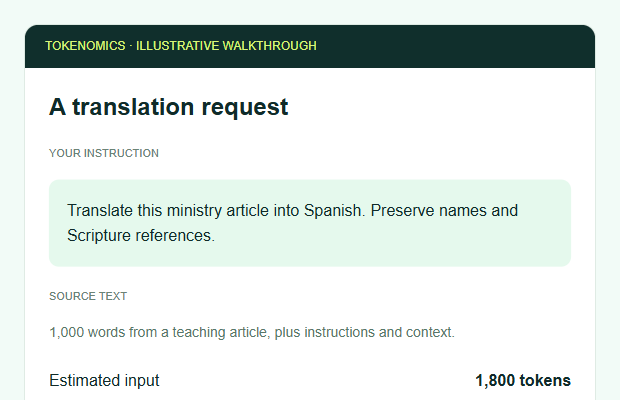 Screenshot of an illustrative app request.
Explore what AI could cost for your next ministry app.
Translate a teaching. Connect a community. Bring an idea to life.
Play with the numbers before you build.
Pick a task. Set your community size. See the cost change.
Planning estimates, not measured model runs. Tokens below are per model call. Include instructions, history, retrieved content and billable reasoning in these allowances.
Retries apply to model and service costs. A job submission is counted as one service call; polling, internal tool loops and app database traffic may add requests. Text-model comparisons use the same estimated token count; actual tokenisation differs by model and language.
Compare a shared workload across all five providers.
Cost benchmark only. These are calculated estimates, not quality scores or measured speed tests. Extra services use the same pipeline or planning allowance across providers. Lower cost does not guarantee a better result.
| Task | Tokens in / out per call | Model calls | Extra services | Total / task |
|---|
Before choosing a model, run the same 20 representative examples through each candidate. Record correctness, human review time, actual tokens, latency, retries and cost per accepted result. Include a fluent reviewer for each target language. No live provider benchmark has been run for this calculator.
Add the tasks your community will use, then set how often they use each one.
Start with a task above and choose “Add task to app budget”. Until then, the budget uses your selected task.
Choose Edit to change a feature’s model or assumptions, then update it from the calculator. Each feature keeps its chosen model, token allowances and retries. Community size applies to every feature. Use tasks per user as an average across all active users; each feature can have a different frequency.
See this app’s full yearly budget ↓Tokens are pieces of text the AI reads and writes. You pay for both directions.
Visual word pieces are illustrative, not a provider tokenizer. For English text, characters ÷ 4 is a rough estimate. Languages, punctuation and model tokenizers vary; API usage is the billing authority.
Your instructions, source document and relevant history become input tokens.
Screenshot of an illustrative app request.The answer becomes output tokens. Thinking models may also bill reasoning tokens.
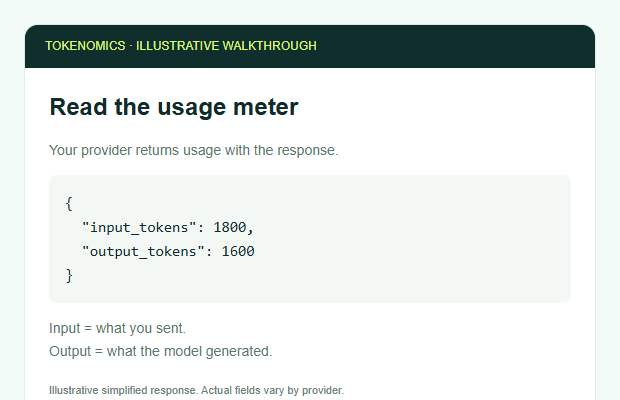 Illustrative usage; no provider call was made.
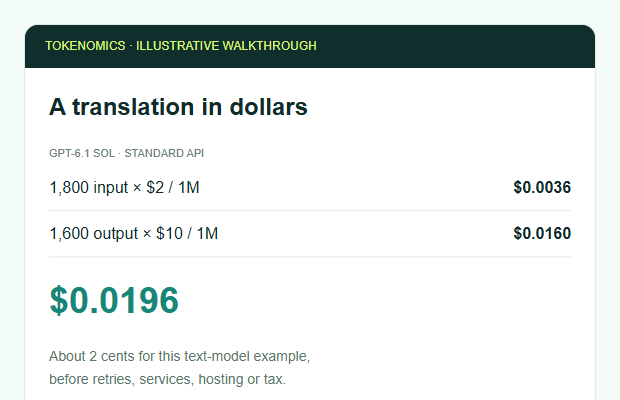 Worked example: GPT-6.1 Sol, one translation.
An API call is one request from your app to a service. A “find a church” button might read your directory, call a model to understand the request, search the database, then call a model again to explain matches. A long conversation can repeatedly send earlier messages as paid input. Cached input may be cheaper, but cache writes and provider rules matter.
Keep API keys on the server. Log cost and request counts, with personal data removed. The calculator runs locally in your browser and makes no paid AI calls.
A good app needs more than tokens. Make room for the whole picture.
Budget covers the selected task above. All allowances are editable, in USD. Defaults are planning examples, not SFG quotes or promised infrastructure capacity.
Example: Supabase Pro starts at $25/month for one project. This plan includes 100,000 monthly active users, 8 GB database disk, 100 GB file storage and 250 GB uncached egress. API requests are included; compute and quota overages still matter. Plan limits do not promise capacity for simultaneous users.
Overages: $0.00325 per active user above 100,000; $0.125/GB database above 8 GB; $0.0213/GB files above 100 GB; $0.09/GB uncached egress above 250 GB. Rates apply to this illustrative single-project Pro configuration. Replace the database base allowance if you use a different provider.
For church matching, budget for collecting and verifying directory data, search indexes, embeddings and updates. Video streaming can dominate bandwidth. Load-test simultaneous users and database connections before launch. Database pricing ↗
Security review, maintenance, licenses and initial development are editable allowances. Include backup restore tests, accessibility, translations, support, app review work, test devices, build services and content rights in your actual quotes.
Web apps need neither store enrollment fee. Store fees are for developer accounts, not per user. Existing publisher arrangements may cover them. Native app development, testing and ongoing store compliance are additional work.
Apple may waive its annual fee for eligible nonprofits after approval; eligibility includes not selling digital goods or services. Do not budget the waiver until approved. Apple waiver rules ↗
Paid apps and digital subscriptions may attract store commissions. Apple lists 30%, with 15% in qualifying programs/subscriptions. Google fees depend on market, billing route and program; a simple 15–30% universal rule is no longer reliable. Use your actual applicable agreement. These costs are separate from developer enrollment.
15% is an editable scenario, not a confirmed rate. Revenue should include only sales subject to this blended fee. Tax, refunds, external payment processing and donation arrangements need separate review.
Keep a baseline, then change the calculator or open another saved budget. See the difference instantly.
Protect the people behind every request, and the budget behind every idea.
Minimise personal data. Get consent for recordings. Keep prayer, pastoral and children’s information out of public prompts. Set retention and deletion rules; check provider data use and residency.
Use sign-in, least privilege and per-church data separation. Keep API keys on your server. Validate files, scan uploads and test that one user cannot read another’s documents.
Set per-user quotas, token caps, rate limits, timeouts and retry limits. Add spend alerts and a server-side stop. A dashboard alert alone does not enforce a hard budget.
Treat uploaded text and search results as untrusted. Restrict tool permissions and review outputs. Require approval before messages, publishing or payments. Escalate sensitive pastoral questions to people.
This is a planning checklist, not a security certification. OWASP guidance ↗
Pricing snapshot checked 9 October 2026. Standard first-party API rates; uncached text input; no batch discounts or tax. Reasoning, tools, image tokens, regional premiums and actual tokenisation can change bills. Mistral Large 4 uses a temporary sale price; DeepSeek uses peak prices. Refresh before procurement.
| Model | Input | Output | Pricing note |
|---|
SFG logo retrieved from the official SFG USA website. App-specific suitability remains to be tested. This playground does not upload documents, call AI providers or store your entries on a server.